Magnifier Types Explained: Handheld, Stand, Dome & Electronic Designs
A technical companion guide to magnifier power (diopters), working distance, and field of view — the optics behind choosing the right form factor.
Reviewed for clarity and usefulness. How we publish
Editorial Independence & Disclosure: LowVisionGuide.org is supported by its readers. When you purchase through links on our site, we may earn an affiliate commission at no extra cost to you. We only recommend products verified for task utility and low-vision accessibility. Read our full Editorial Independence Charter.
1. Executive Summary: Matching Magnifier Design to the Task
This guide is a form-factor companion focused on how handheld, stand, dome, and electronic magnifier designs differ in daily use. For power, diopters, and working-distance calculations, see our companion guide, What Magnification Strength Do I Need? If you want the complete step-by-step buying process instead — including how to test devices, questions to ask before purchasing, and common buying mistakes — see our full guide, Choosing a Magnifier for Low Vision.
A high-power lens that makes letters large but shows only three characters at a time can make continuous reading frustrating. Conversely, a stable stand or dome magnifier with moderate power may allow fast, comfortable line tracking across books or newspapers.
Choosing the right magnifier requires matching the device’s physical design to your specific activity, hand stability, working distance requirements, and visual environment. This guide compares primary optical and electronic form factors to help you assemble an effective low-vision toolkit.
2. Form-Factor Comparison Matrix
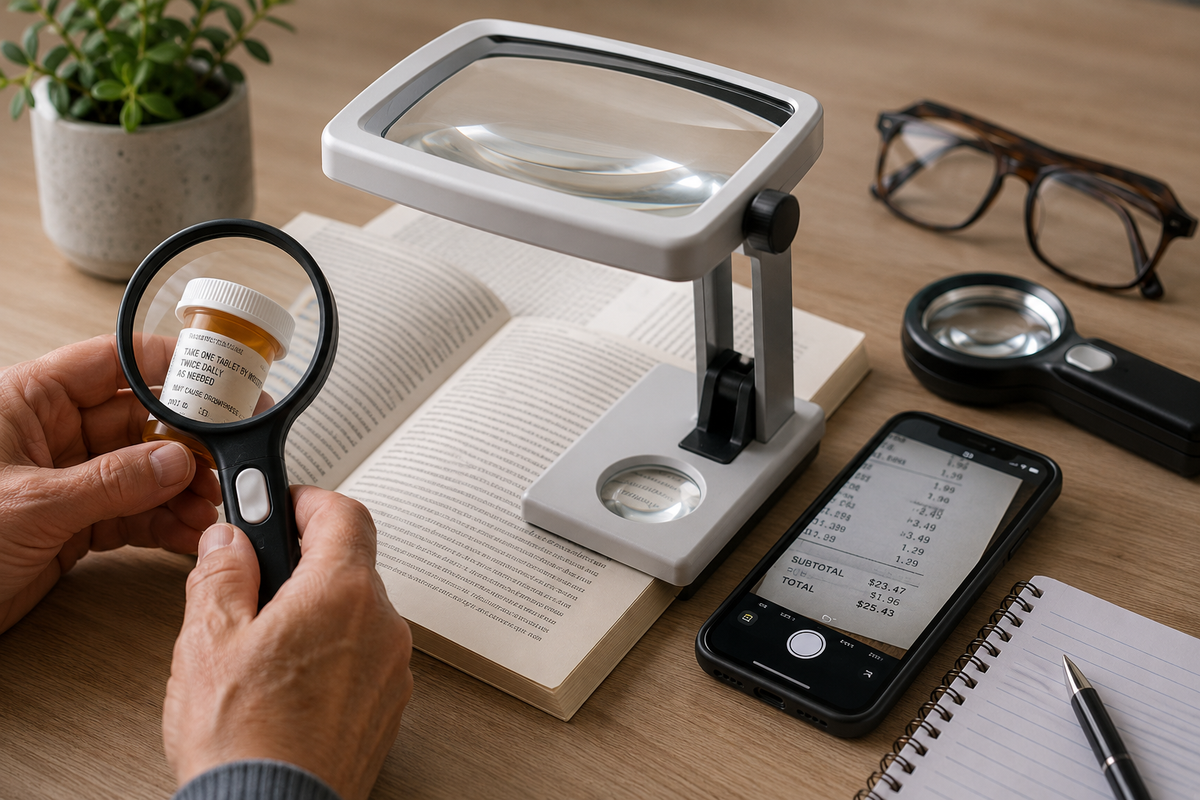
Before evaluating technical specifications, use this overview to compare how common magnifier designs function during daily tasks:
|
Magnifier Type |
Often Useful For |
Primary Advantage |
Primary Trade-Off
|
|
Handheld Magnifiers |
Spot-reading price tags, menus, medication bottles, thermostats, and receipts away from home. |
Highly portable; fits in pockets/purses; allows quick eye-to-lens positioning. |
Requires hand strength and steadiness; can cause fatigue during long reading sessions. |
|
Stand Magnifiers |
Extended table reading of mail, books, bills, and financial documents. |
Maintains fixed focal distance directly on the page; eliminates arm strain and tremor fatigue. |
Less portable; restricts working space under the lens for writing or handwork. |
|
Dome / Bright-Field Magnifiers |
Flat printed materials, newspapers, magazines, books, and maps. |
Glides effortlessly on flat pages; gathers ambient light to brighten the visual field naturally. |
Restricted to flat surfaces; provides zero clearance beneath the lens for tools or pens. |
|
Smartphone / Tablet Apps |
Unexpected spot reading, package labels, or menus when away from dedicated tools. |
Utilizes hardware already carried; offers built-in camera zoom, flash, and contrast toggles. |
Requires two-handed holding or stand positioning; susceptible to screen glare. |
|
Electronic / Video Magnifiers |
High-magnification requirements, severe contrast loss, or continuous extended reading. |
Variable high zoom (2× to 60×+), customizable high-contrast text modes, and line guides. |
Higher financial investment; requires battery charging or dedicated desktop space. |
3. The 5-Step Decision Framework
To narrow down the correct magnifier design, evaluate your needs through five practical questions:
- What is the specific task duration? Short "spot" tasks (checking a price or label) favor compact handheld tools. Extended "sustained" reading (books or correspondence) favors self-supporting stand, dome, or electronic systems.
- Where will the activity take place? Mobile tasks away from home demand pocket portability. Seated table tasks allow larger, more stable desktop or stand systems.
- How steady are your hands and grip? If hand tremors, arthritis, or fatigue make holding a lens steady difficult, choose a stand or dome magnifier that rests directly on the page.
- How much text do you need to see at once? Reading continuous lines requires a generous field of view. Lower-power wide lenses or large electronic screens preserve context better than small, ultra-high-power optical lenses.
- Do you need physical clearance under the lens? Writing checks, signing forms, threading needles, or working with tools requires a stand magnifier designed with high clearance or an adjustable electronic camera arm.
4. Power, Diopters, and Trade-Offs
Magnification strength is a separate topic from device form factor, with its own trade-offs between field of view, working distance, and lighting. Rather than duplicate that explanation here, see our dedicated guide: What Magnification Strength Do I Need? A Guide to Magnifier Power & Diopters — it covers diopters vs. "×" power labels, the field-of-view/working-distance/lighting trade-offs, and a decision workflow for choosing a strength.
5. In-Depth Form-Factor Analysis
Handheld Magnifiers
Handheld magnifiers are the most common portable optical aid. They allow flexible positioning for quick, intermittent tasks.
- Best Suited For: Spot-reading menus, price tags, shelf labels, thermostats, and prescription bottle names.
- Selection Tip: Look for models with built-in LED task lighting. Integrated lighting improves contrast dramatically and eliminates shadows cast by the user's head or hand. View illuminated handheld magnifiers on Visible Living.
Stand Magnifiers
Stand magnifiers enclose the lens in a plastic or metal housing that rests directly on the reading material, holding the lens at a fixed, pre-focused distance.
- Best Suited For: Reading mail, books, magazines, or long documents at a desk or table, especially for individuals with hand tremors or arthritis.
- Selection Tip: Because stand magnifiers rest on the page, the user must look down into the lens. Maintaining comfortable neck posture may require pairing a stand magnifier with an angled reading desk or slant board.
Dome and Bright-Field Magnifiers
Dome magnifiers are solid optical-grade acrylic or glass hemispheres that sit directly on flat print. Their curved shape gathers ambient room light and directs it into the viewing area.
- Best Suited For: Reading newspapers, financial ledgers, books, maps, and flat photographs.
- Selection Tip: Dome magnifiers offer high optical stability and slide smoothly across pages without scratching print when fitted with protective bottom ridges.
Electronic & Video Magnifiers (Digital CCTV)
When optical lenses no longer provide sufficient field of view or contrast, electronic video magnifiers use camera sensors and digital displays to enlarge text from 2× up to 60× or higher.
- Best Suited For: Significant vision loss, severe contrast sensitivity reduction, or heavy reading/writing demands.
- Key Advantage: Allows users to toggle high-contrast color pairs (e.g., bright yellow text on a black background) to ease visual fatigue. For a detailed breakdown of portable vs. desktop systems, see our dedicated guide: Video Magnifiers & Digital CCTV Explainer.
6. The Role of Low-Vision Evaluations & Rehabilitation
Selecting optical devices over the counter without professional guidance often leads to purchasing magnifiers that are either too strong or ergonomically unsuitable. A comprehensive low-vision evaluation conducted by an optometrist, ophthalmologist, or occupational therapist (OT) specializing in low vision provides personalized device matching.
According to the American Optometric Association's clinical practice guideline on low vision rehabilitation, a professional evaluation includes:
- Measuring visual acuity, visual field, and contrast sensitivity.
- Evaluating scotoma location and eccentric viewing skills to guide device selection and design.
- Trialing optical and electronic magnification devices, along with glare control and contrast-enhancement strategies.
- Referral to occupational therapy or other vision-rehabilitation professionals for hands-on training when broader daily-living support is needed.
7. Related Guides & Internal Link Mesh
Build a comprehensive home accessibility strategy by visiting our related educational guides:
- Choosing a Magnifier for Low Vision — Our complete buying guide: device types, testing before purchase, and common buying mistakes.
- What Magnification Strength Do I Need? A Guide to Magnifier Power & Diopters — Technical calculations, working distance equations, and diopter conversion tables.
- Kitchen Accessibility for Low Vision — Practical contrast, tactile marking, and environmental adaptations for meal preparation.
- Home Lighting and Contrast Solutions — Optimizing task illumination, reducing glare, and improving home safety.
- Reading Strategies with Low Vision — Combining lighting, contrast, line guides, and adaptive techniques for continuous reading.
Educational Disclaimer
This guide is provided strictly for educational and device-selection purposes. LowVisionGuide.org does not offer medical advice, diagnosis, or clinical treatment plans. Product references may link to items available through Visible Living LLC or affiliate partners. Always consult a qualified eye care professional, low-vision optometrist, or certified occupational therapist for individualized visual evaluations and hands-on assistive technology guidance.